♻️ Miner Lifecycle
Miners on RedTeam move through a repeatable loop: prepare environment, build a submission, pass validation/comparison, get scored, and earn rewards until decay. Understanding this lifecycle helps you submit at the right time and avoid avoidable failures.
Roadmap stages
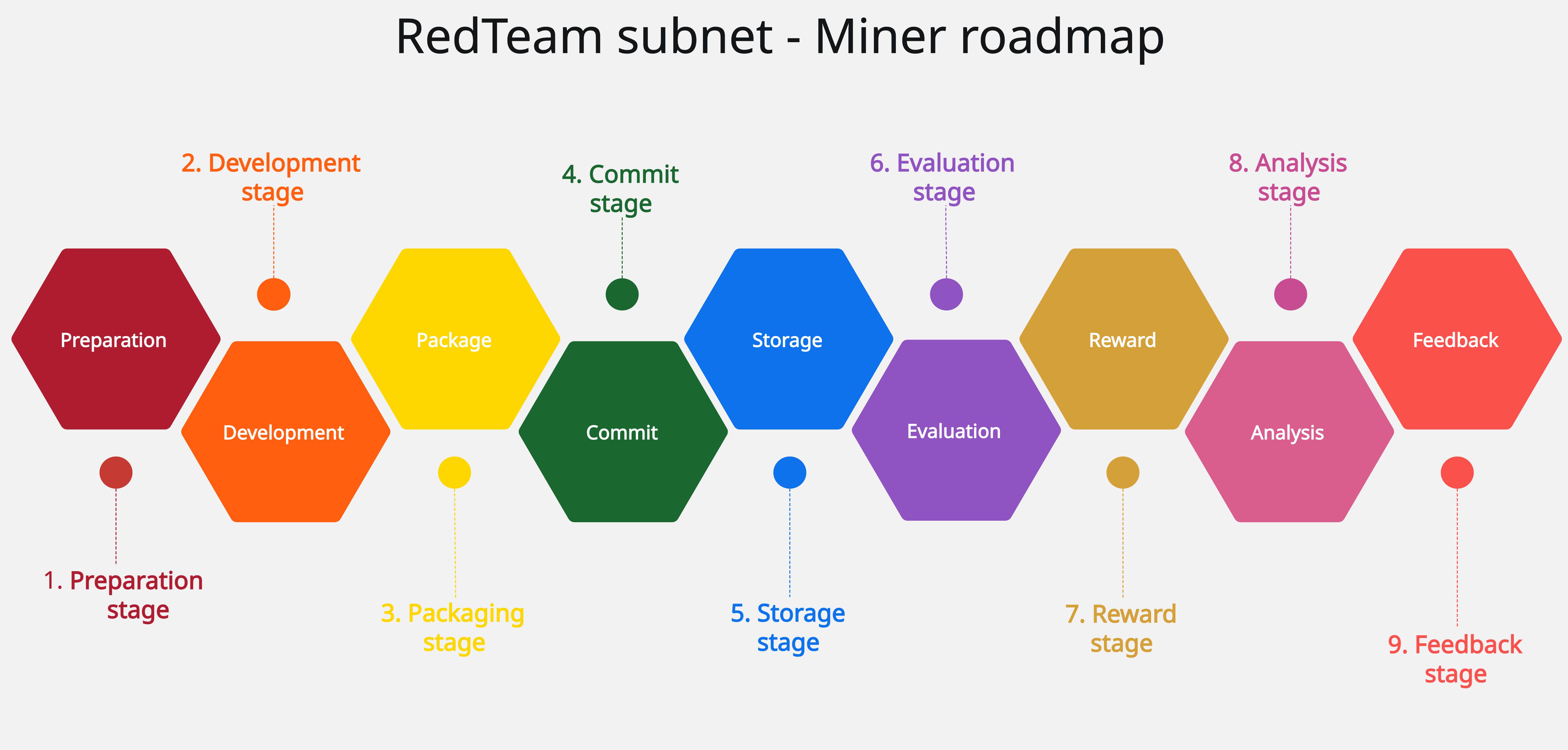
Lifecycle
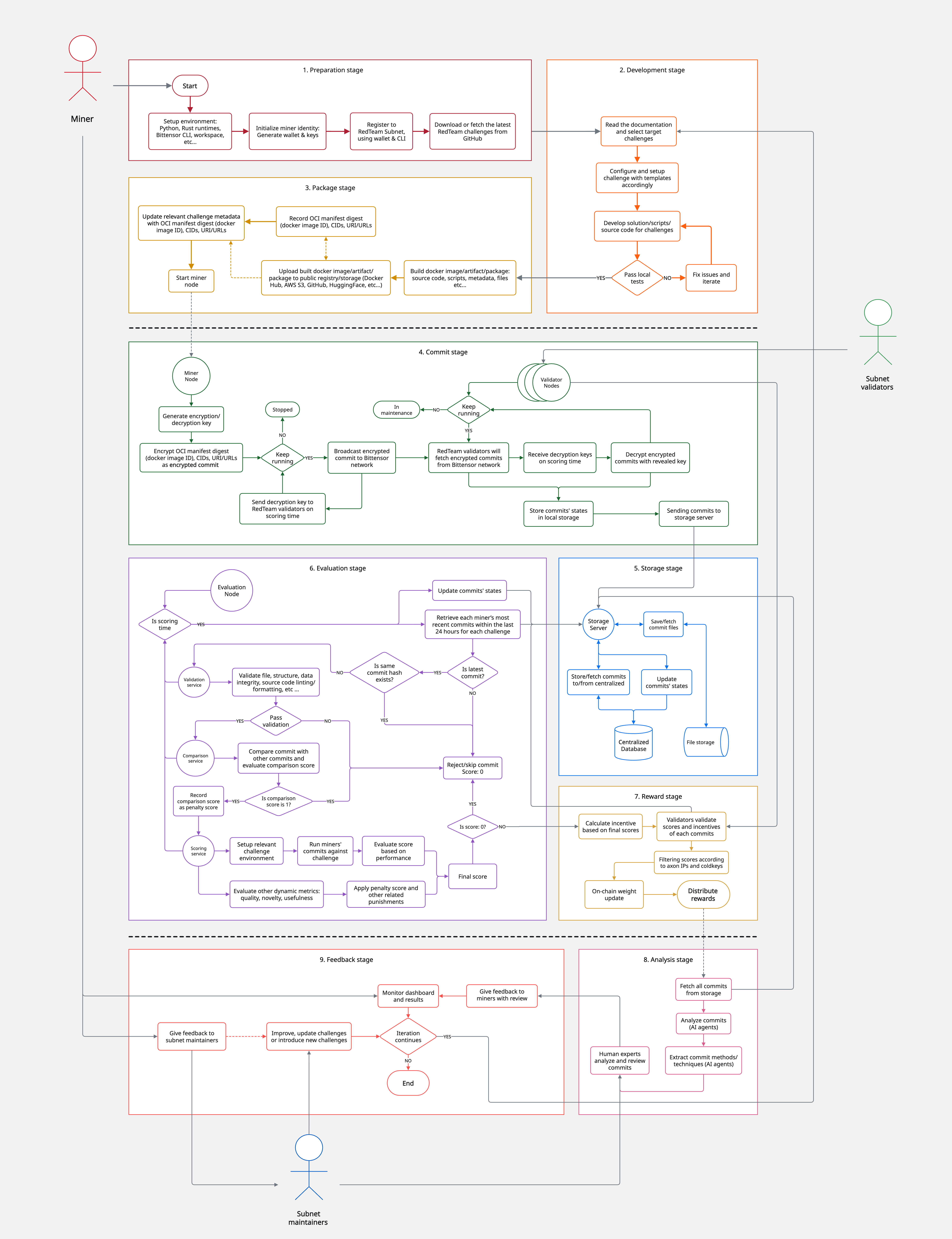
End-to-End Flow
flowchart TB
    subgraph TOP[Build and Submit]
        direction LR
        A[Prepare Environment] --> B[Build Submission] --> C[Push Commit Image] --> D[Commit Cooldown ~24h]
    end

    D --> E[Validation]

    subgraph BOTTOM[Evaluate -> Acceptance -> Outcome]
        direction LR
        E -->|Pass| F[Comparison] --> G[Scoring] --> H{Accepted?}
        H -->|Yes| I[Rewards Active] --> K[Decaying] --> L[Decayed]
    end

    E -->|Fail| X[Invalid]
    H -->|No| J[Rejected]
    X -. Fix and resubmit .-> B
    J -. Improve and resubmit .-> B
Stage-by-Stage
1) Prepare Environment
- Set up Docker and registry access (PAT), and keep challenge images under one Docker Hub username.
- Use private repositories to protect your solution.
- References: Docker Hub Registry & PAT, Submission Templates.
2) Build Submission from Template
- Start from the challenge template and keep fixed files unchanged (
app.py,Dockerfilewhere required). - Implement only required files/functions and respect per-challenge limits (file count, line limits, timeouts).
- Reference: Submission Templates.
3) Local Pre-Checks
- Run local checks before pushing:
- ESLint for JavaScript challenges
- Pylint for Python challenges
- Ruff checks when the challenge requires
.ruff.toml - This is the fastest way to avoid
Invalidoutcomes. - Reference: Validation.
4) Submit and Wait for Cooldown
- Push your commit/image and wait through commit cooldown (~24 hours) before reveal/scoring pipeline runs.
- Limit: one commit per challenge per 24-hour window; latest same-day commit replaces earlier ones.
- Plan timing against the daily incentive cutoff (2:00 PM UTC).
- Reference: Commit Cooldown & Submission Timing.
5) Validation
- System checks file structure, required functions, lint/format compliance, and anti-bypass integrity rules.
- If validation fails, status becomes
Invalidand scoring stops. - Reference: Validation.
6) Comparison
- Valid submissions are compared against accepted history + same-day submissions.
- Similarity penalties and thresholds are applied (with stricter same-UID handling in many challenges).
- Excessive similarity can skip or heavily penalize your run.
- Reference: Submission Comparison.
7) Scoring and Acceptance
- Challenge logic computes raw score; penalties adjust final score.
- Acceptance typically requires: valid submission, score above challenge threshold, and acceptable similarity.
- Track details in dashboard payload columns (
Validation Output,Comparison Logs,Result JSON). - Reference: Dashboard.
8) Rewards and Decay
- Accepted submissions become reward-active; emissions are determined through validator weights and Yuma consensus.
- New commits replace previous earning submissions immediately.
- Score value decays over time, so continuous improvement is part of normal strategy.
- References: Incentive Mechanism, Dashboard.
Status Journey You Will See
- Common progression:
Received->Accepted/Rejected/Invalid->Decaying->Decayed. Invalidmeans validation/integrity failure;Rejectedmeans scored but did not pass acceptance criteria.- All statuses and debug payloads are visible in the dashboard history table.
- Reference: Dashboard Status Lifecycle.
Practical Operating Routine
- Build from template and keep fixed files untouched.
- Run challenge-required lint/format checks locally (including Ruff where required).
- Push once with your best version for that day.
- Watch dashboard status/payloads and use failure notes to iterate.
- Resubmit strategically before heavy decay and before incentive cutoff windows.